
Author: Stan Switaj
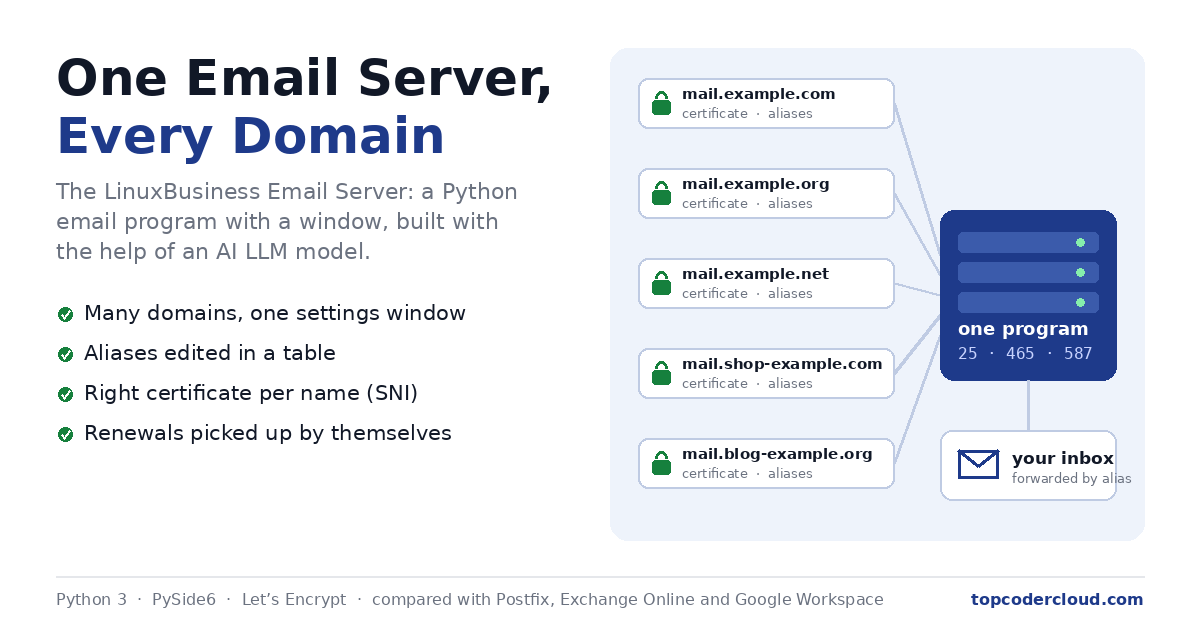
I run websites of more than 10 or so domain names, and every one of them needs email: a ceo@ address, a noreply@ for the site's own messages, a support@, a dmarc-reports@. For years that meant Postfix, plus Dovecot, plus OpenDKIM, plus a pile of configuration files. So I built my own mail server instead: the LinuxBusiness Email Server, a Python program with a proper window, where adding a domain, an address or a certificate is a few clicks.
It was vibe coded: I used an AI LLM model to assist with the programming. I described what the program should do, the model wrote the code, and I tested it on my own server, reported what went wrong and asked for the next change. It is now my real mail server. It accepts the mail for all of my domains, forwards each address where it should go, and sends the messages my websites send.
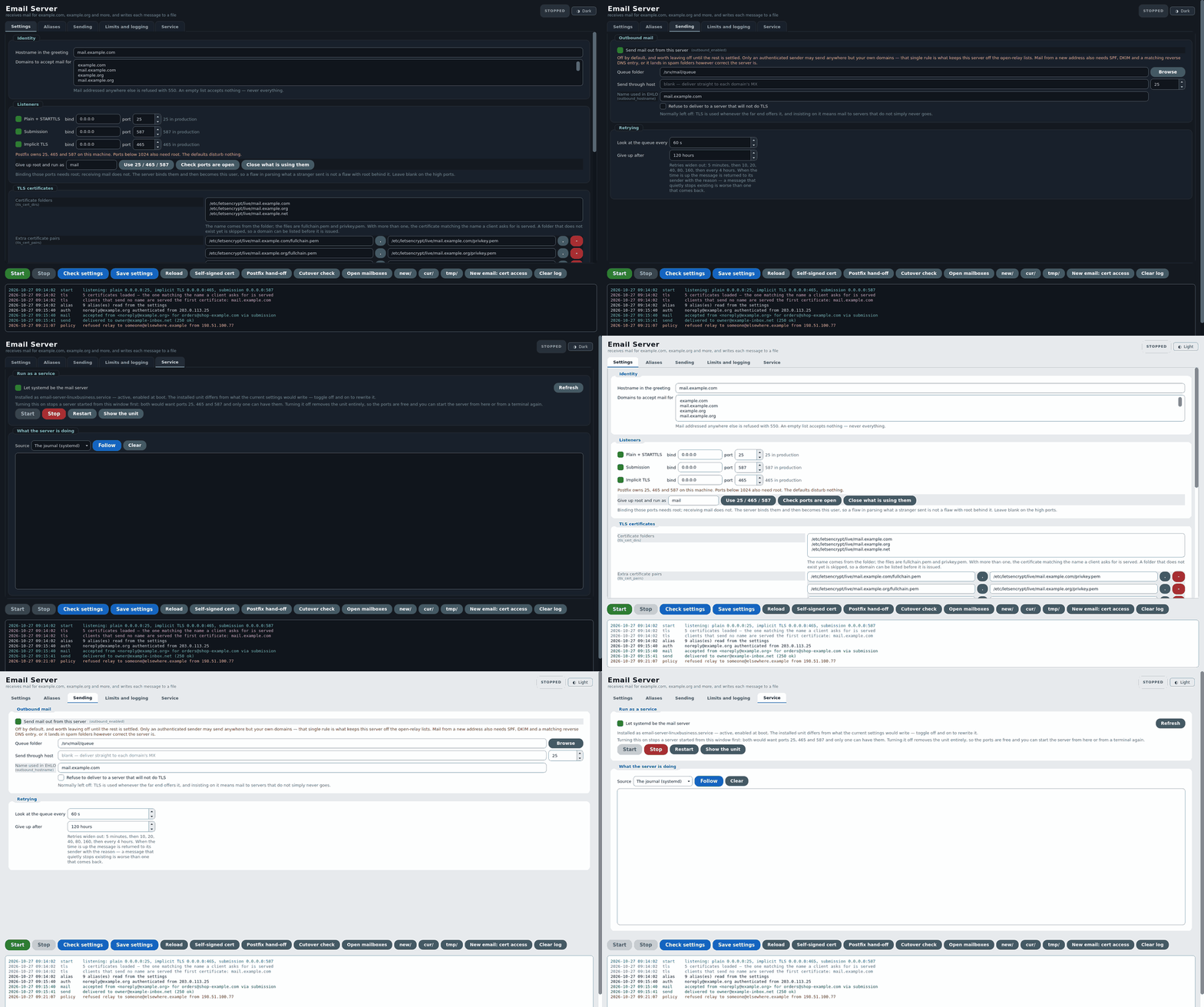
The window, tab by tab, in the dark and the light theme. The screenshots use example domains (example.com and so on), not my own.
What it is
Two Python 3 files that share one settings file:
- email_server_linuxbusiness.py is the mail server itself. It speaks SMTP on the three ports a mail server is expected to answer on: 25 (plain, with STARTTLS), 465 (encrypted from the first byte) and 587 (submission, for programs and people sending mail).
- email_server_gui.py is the window, built with PySide6 (Qt). It edits the settings, starts and stops the server, and shows the server's log as it happens, in colour.
Neither program owns the settings file. The server can run on its own from the command line or as a systemd service, and the window will still show the settings it is using.
Every tab, explained
Settings
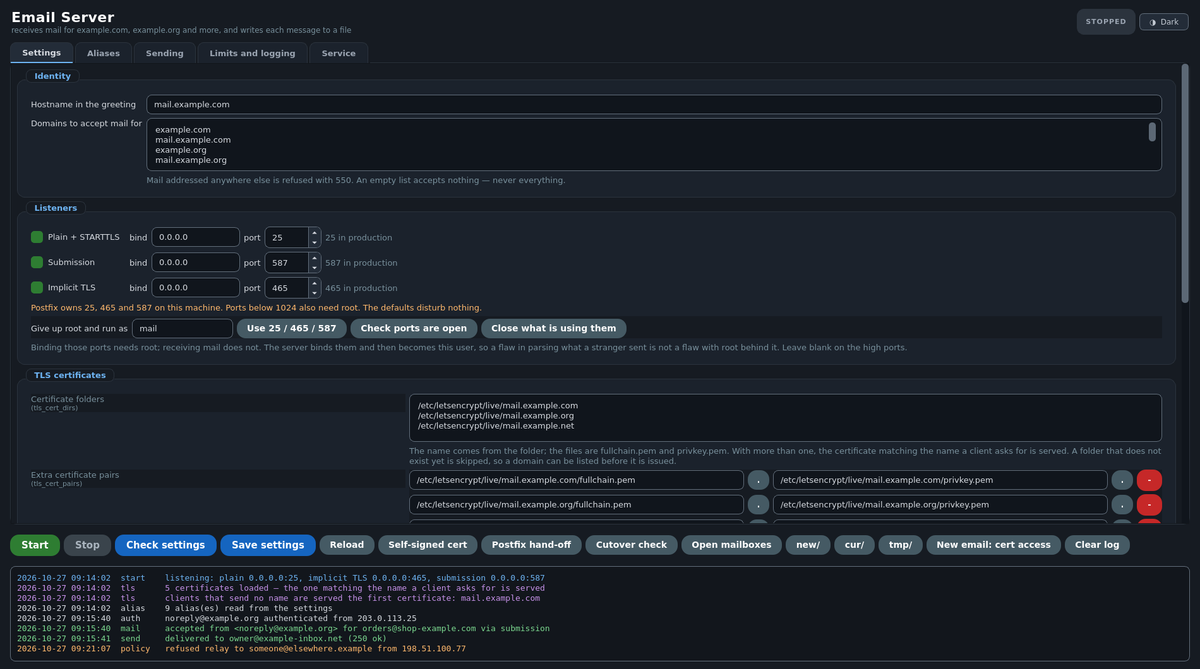
- Hostname in the greeting: the name the server introduces itself with, such as mail.example.com.
- Domains to accept mail for: one domain per line. Mail addressed to anything else is refused. An empty list accepts nothing, never everything.
- Listeners: each of the three ports can be switched on or off, with its own address and port number. A button sets the real ports (25 / 465 / 587), another checks they are free, and another closes whatever is holding them.
- Give up root and run as: ports below 1024 need root to open, but nothing after that does. The server opens its ports, then becomes an ordinary user, so a bug in reading what a stranger sent is never a bug with root behind it.
- TLS certificates: a list of certificate folders (the way Let's Encrypt lays them out), plus extra certificate and key pairs. A folder that does not exist yet is skipped, so a domain can be listed before its certificate is issued.
Aliases
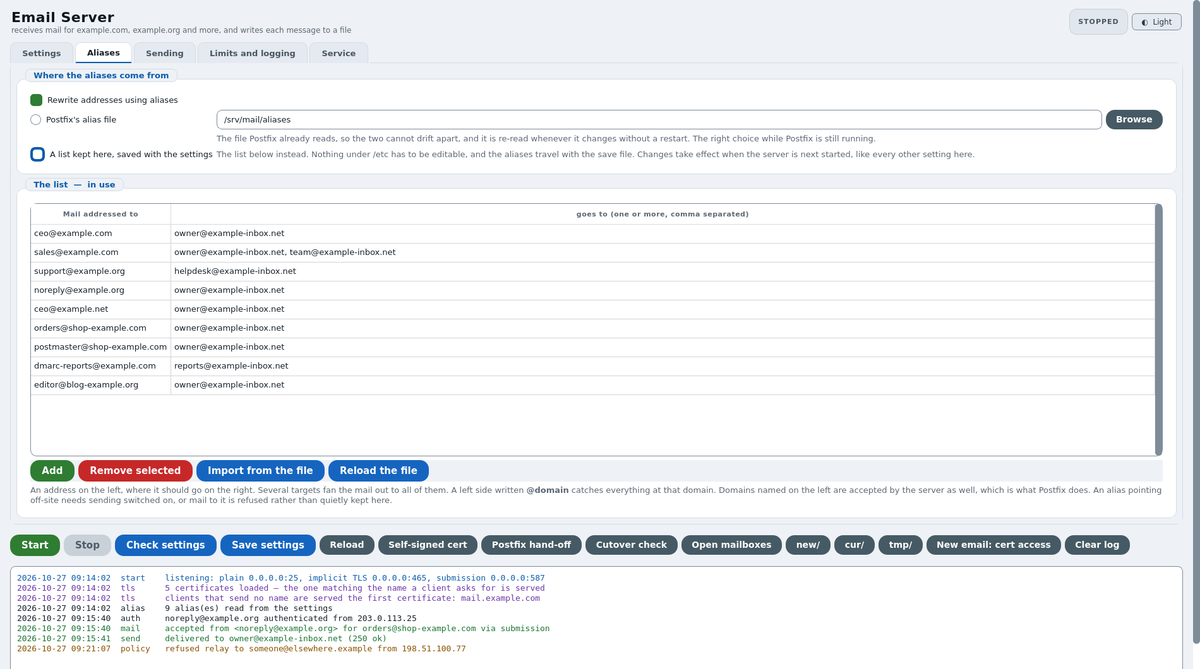
An alias says where mail for an address goes: ceo@example.com to my real inbox, sales@example.com to two people. The tab is a plain table, an address on the left and one or more destinations on the right. A left side written as @example.com catches everything at that domain. The list can live in the settings or in a Postfix-style alias file, and the server re-reads the file the moment it changes, with no restart.
Sending
Sending is off by default, because a server that can send can be abused into sending. Only a signed-in sender may send anywhere other than my own domains, and that one rule is what keeps the server off the open-relay blacklists. Mail waiting to go out sits in a queue folder. Retries widen out (5 minutes, then 10, 20, 40, 80, 160, then every 4 hours). After 5 days a message that still cannot be delivered goes back to its sender with the reason, because a message that quietly disappears is worse than one that comes back.
Limits and logging
Largest message (25 MB), recipients per message, connections at once, bad commands before hanging up, and timeouts. Sign-in can be checked by Dovecot or by the program's own list of logins. Mail can be passed through OpenDKIM. There is also an optional log file, and a switch to log every SMTP command for tracking down a fault.
Service
One switch makes the mail server a systemd service: it starts at boot and restarts if it ever stops. The tab shows the service's state and follows its log live. Start, Stop, Restart and Show the unit are buttons.
The buttons along the bottom
Start, Stop, Check settings (the server checks its own configuration and reports problems), Save settings, Reload, Self-signed cert (for testing the encrypted ports), Postfix hand-off and Cutover check (for moving over from Postfix), Open mailboxes and New email: cert access. The last one is new: a brand-new certificate starts out readable only by root, so after adding a new email domain one click lets the mail server read it.
The rule it never breaks
When a mail server answers 250 OK, the sending server is allowed to delete its copy. So this program writes the message to disk and makes sure it is really there (fsync) before it says 250. If a message cannot be stored, it answers with a temporary error, so the sender simply tries again later. Each message is written to a temporary file first and then moved into place in one step, so a crash halfway through can never leave half a message where a whole one belongs.
Many domains and their certificates: compared with Postfix
Postfix is excellent. It is fast, it is proven, and it can handle as many domains as you like. But each new domain touches several places, and the certificates take the most work:
| Task | Postfix | LinuxBusiness Email Server |
|---|---|---|
| Add a domain | Edit main.cf (virtual_alias_domains or virtual_mailbox_domains), then reload | Add a line under Domains to accept mail for, then Save |
| Add an address | Edit the alias map, run postmap, reload | Add a row on the Aliases tab (or edit the alias file: it is re-read by itself) |
| A certificate per domain | Postfix 3.4 or later: write a tls_server_sni_maps file, one line per name, and build it with postmap -F | List the certificate folder. The certificate matching the name the client asks for is chosen by itself (SNI) |
| After a certificate renews | Run postmap -F again and reload, or the old certificate is served | Nothing: the server checks its certificates every hour, and a deploy hook restarts it right after a renewal |
| Signing in to send | Usually a second program, Dovecot (SASL) | Built in, or ask Dovecot |
| See what it is doing | Read the mail log | A coloured live log in the window |
On my server that adds up to ten mail names (mail.domain for each domain), each served with its own Let's Encrypt certificate on ports 465 and 587. Adding the newest two domains took a few minutes: add the domain, add the alias, issue the certificate, click the button, restart.
To be fair to Postfix: it has decades of hardening behind it, and it does far more than this program, such as content filters, policy services and huge volumes. If you run a mail system for thousands of users, use Postfix. For one person or a small business with many domains, a program that holds everything in one window is a lot less to get wrong.
Compared with Microsoft Exchange and Google Workspace
The usual alternative to running a mail server is renting one. Microsoft sells Exchange Online, the cloud version of Exchange Server, and Google sells Google Workspace, which is Gmail for businesses. Both are very good, and both charge per mailbox:
| Exchange Online (Plan 1) | Google Workspace (Business Starter) | LinuxBusiness Email Server | |
|---|---|---|---|
| Price | About $4 per user a month, paid yearly | About $7 per user a month paid yearly, $8.40 monthly | No fee to run it yourself. For businesses: $2 per user a month, 10% discount purchased annually, to be talked about |
| Your own domains | Yes | Yes | Yes, as many as you list |
| Mailbox storage | 50 GB per user | 30 GB per user (pooled) | Your own disk |
| Webmail, calendar, phone apps | Yes | Yes | No: it forwards mail to the inbox you already use |
| Spam and virus filtering | Yes, built in | Yes, built in | Refuses relaying and mail for unknown names. No content filter |
| Uptime and backups | Microsoft's job | Google's job | Your job |
| Where the mail lives | Microsoft's data centers | Google's data centers | Your own machine, also optionally, on LinuxBusiness's Servers |
Prices are US list prices as of October 2026 and vary by country and billing term.
The big difference is what you pay for. Exchange and Workspace charge per user. Both let you add extra addresses (aliases) to a paid mailbox, but every separate mailbox is another monthly fee, and each extra domain has to be verified and set up in the admin center. Here a domain is a line in a list and an address is a row in the alias table, so twenty addresses across ten domains cost the same as one: nothing.
What you give up is everything those companies do for you: spam filtering, storage, webmail, calendars, phone apps, guaranteed uptime, and a sending reputation that other mail servers already trust. Running your own server means you need a fixed IP address, correct DNS records (MX, SPF, DKIM and DMARC), and a reverse DNS entry, or your mail lands in spam folders. For my sites it is the right trade. For a company where email simply has to work all day, every day, Exchange Online or Google Workspace is still the safer choice, though the LinuxBusiness Email Server does email nicely and works fine.
For businesses
If you would like the LinuxBusiness Email Server running for your business, with your domains, addresses and certificates set up and looked after, a fee of $2 per user a month, with a 10% discount purchased annually, can be talked about. That is half the price of Exchange Online Plan 1 and well under Google Workspace. Let's talk:
Email: ceo@goodinternetsearch.com
Phone: 215-954-4908
LinuxBusiness Email Server for businesses: $2 per user a month, 10% discount purchased annually, to be talked about.
What vibe coding was like
I did not write this line by line. I said what I wanted, for example "one window for all my domains", "show me each message as it arrives", "pick the right certificate for each name", and the AI model wrote it. Then I ran it against real mail and sent back what I saw. The program is written in Python 3, and much of it is careful comments explaining why each piece is the way it is.
It is not magic. Real mail turned up real bugs, and each one became a fix. The latest was small but telling: certificates listed as pairs were silently ignored, because the server only read settings it already had a default for. Two domains were being served another domain's certificate until it was found and fixed. Testing against real mail is still the job of the person running the server. What AI changes is how quickly an idea becomes a working program.
Sources
- Microsoft: Compare Exchange Online plans
- o365hq: Exchange Online Plan 1 vs Plan 2 vs Kiosk vs Business Basic
- Email Vendor Selection: Google Workspace pricing (2026)
- Postfix documentation: tls_server_sni_maps
- Postfix documentation: Virtual domain hosting
- Let's Encrypt community: Postfix serving an expired certificate on port 465
0 Comments
No comments yet. Be the first!
Leave a Comment